

How to Create Tattoo Designs with AI: Step-by-Step Guide
Getting a tattoo often starts with a feeling, not a finished design. You know the memory or symbol you want, but translating that into clean lines on skin is a massive challenge. If you are wondering how to create tattoo designs with AI to test your ideas before getting inked, you are in the right place. In this guide, we’ll show you how to turn rough concepts, pet photos, and lettering into perfect visual references using Tat Ink's AI tattoo generator.
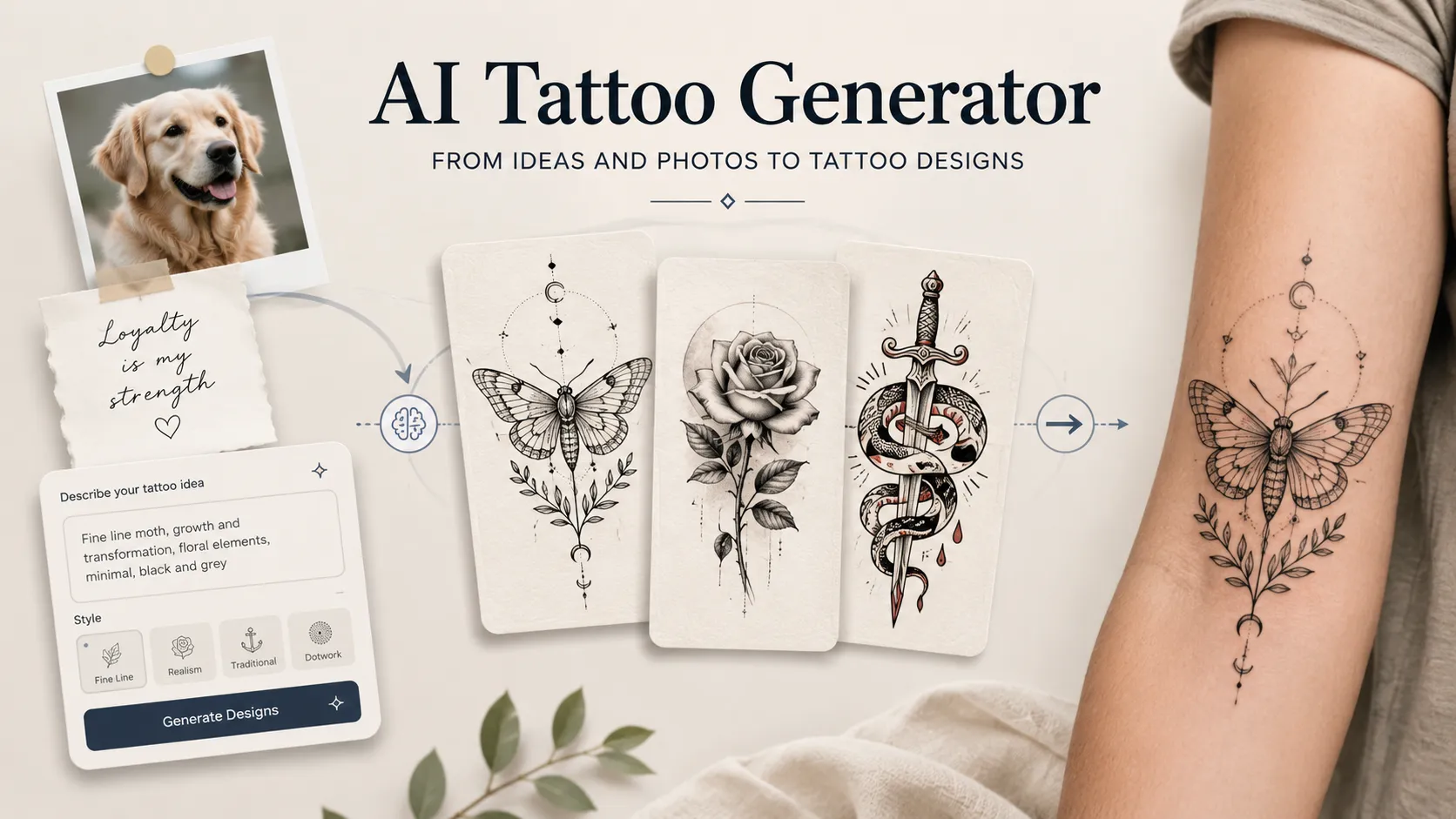
What an AI Tattoo Generator Actually Does
An AI tattoo generator turns your input into tattoo-style artwork. That input can be a written idea, an uploaded image, a name, a quote, or a placement reference.
The useful part is not only speed. It is the ability to test different creative directions before you commit.
For example, the same idea can become very different designs:
- A wolf tattoo can be fine line, blackwork, geometric, realistic, or Japanese-inspired.
- A rose can look soft and minimal, bold and traditional, or dramatic in black and grey.
- A name tattoo can feel elegant in cursive, serious in gothic lettering, or clean in a thin modern script.
- A pet photo can become a detailed portrait, a simple outline, or a symbolic memorial piece.
A regular image generator may create something visually impressive, but tattoo design has its own rules. A tattoo needs to work on skin, not just on a screen. It needs readable lines, balanced spacing, and enough simplicity to hold its shape over time.
That is why the best AI tattoo workflow is not “generate once and use it directly.” It is closer to sketching. You generate, compare, refine, and then bring the strongest direction to a tattoo artist.
How AI Turns a Tattoo Idea into a Design
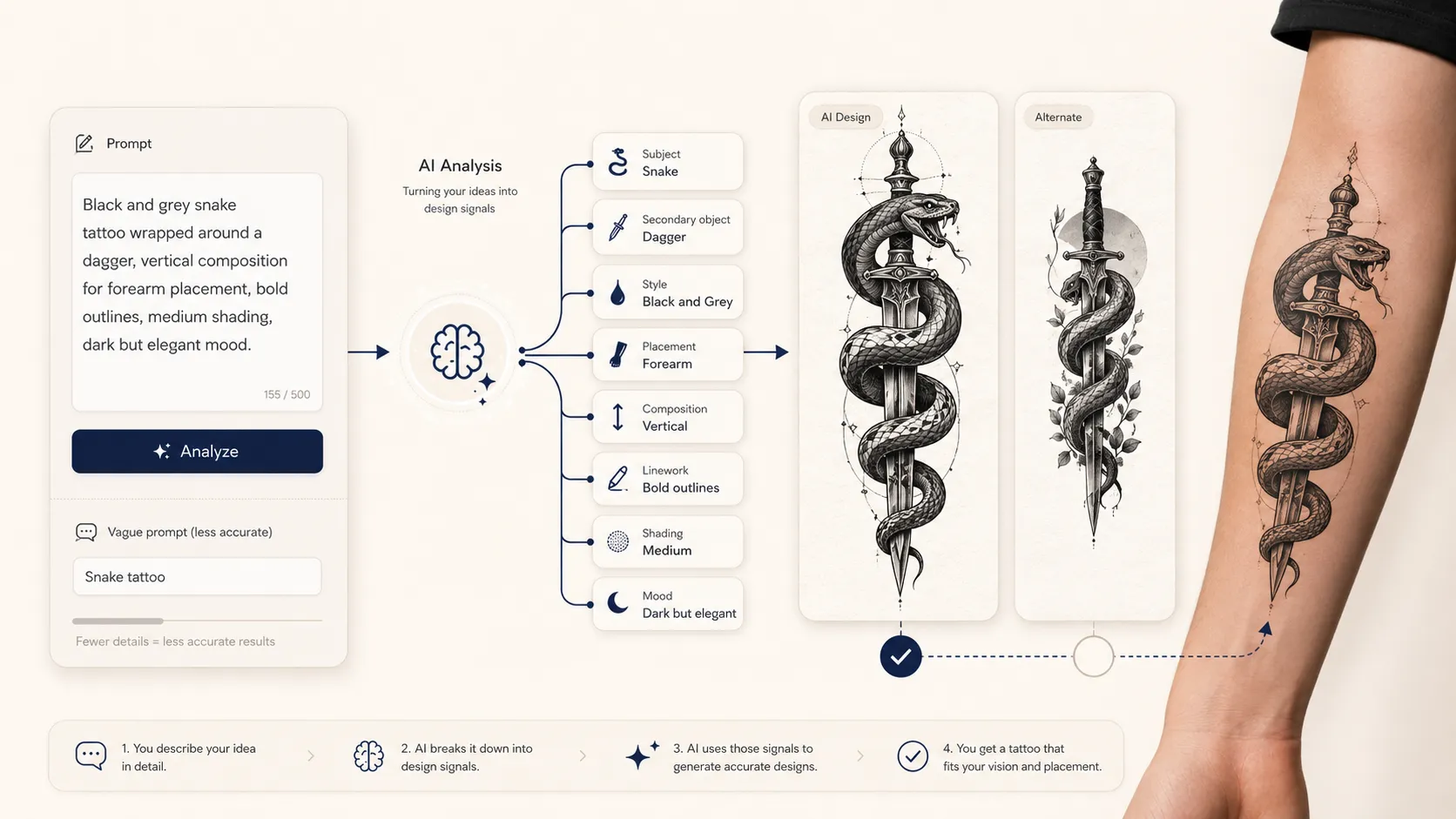
AI tattoo design usually starts by reading the key parts of your input. If you write “black and grey snake tattoo wrapped around a dagger, forearm placement, bold outline,” the AI does not treat that as one flat sentence. It breaks the idea into design signals.
- The main subject is the snake.
- The secondary object is the dagger.
- The style is black and grey.
- The placement is the forearm.
- The visual direction is bold and readable.
These details guide the composition. The AI decides how the snake may curve around the dagger, how much contrast to use, and how to make the design feel suitable for the requested placement.
A vague prompt usually creates a vague result. “Snake tattoo” gives the AI too much freedom. You may get something decorative, but not necessarily something personal or usable. A stronger prompt gives the AI boundaries.
A better prompt would be:
“Black and grey snake tattoo wrapped around a dagger, vertical composition for forearm placement, bold outlines, medium shading, dark but elegant mood.”
This works better because it tells the AI what to draw, how to style it, where it might go, and how detailed it should be.
How to Write a Better Tattoo Prompt
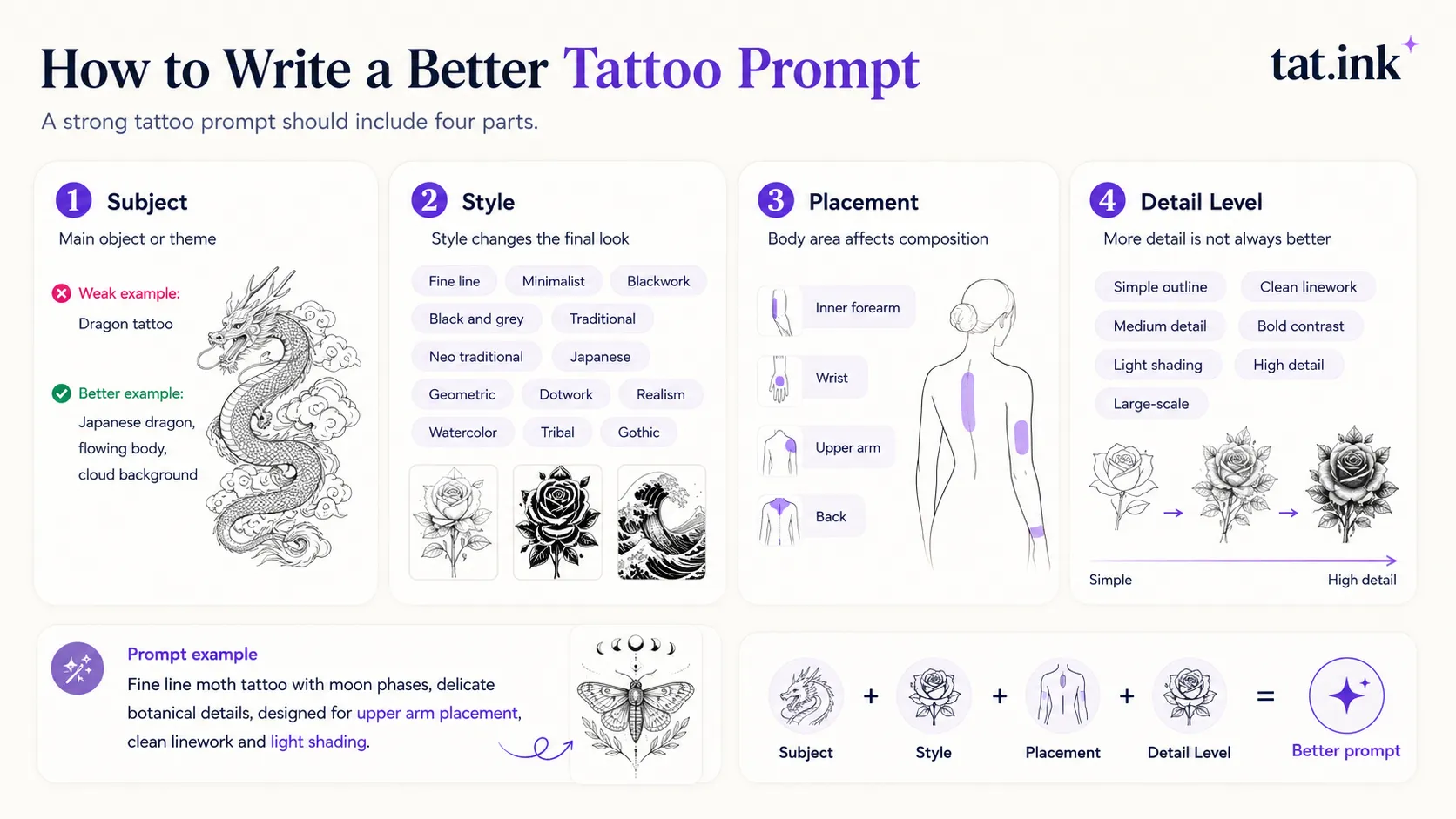
A strong tattoo prompt should include four parts:
Subject
This is the main object or theme of the tattoo. It can be an animal, flower, symbol, portrait, mythological figure, object, or abstract idea.
- Weak example:
“Dragon tattoo”
- Better example:
“Japanese dragon tattoo with flowing body, cloud background, and fierce expression”
Style
Tattoo style changes everything. A lion tattoo in fine line style feels completely different from a lion tattoo in blackwork or realism.
Useful style words include:
- Fine line
- Minimalist
- Blackwork
- Black and grey
- Traditional
- Neo traditional
- Japanese
- Geometric
- Dotwork
- Realism
- Watercolor
- Tribal
- Gothic
Placement
Placement matters because the body affects composition. A forearm tattoo often works well with vertical flow. A shoulder tattoo may suit rounded or curved compositions. A back tattoo can hold more detail. A wrist tattoo usually needs simpler shapes.
Add placement directly into the prompt:
“Designed for inner forearm placement”
“Small wrist tattoo with clean lines”
“Upper arm tattoo with vertical composition”
“Back tattoo with large symmetrical layout”
Detail Level
Not every tattoo should be highly detailed. Small tattoos need cleaner shapes. Large tattoos can carry more shading and texture.
Useful detail descriptions include:
- Simple outline
- Clean linework
- Medium detail
- Bold contrast
- Light shading
- High detail
- Large-scale composition
Here is a complete prompt example:
“Fine line moth tattoo with moon phases, delicate botanical details, calm mystical mood, designed for upper arm placement, clean linework and light shading.”
This gives the AI enough structure without making the design too crowded.
Turning Photos into Tattoo Designs
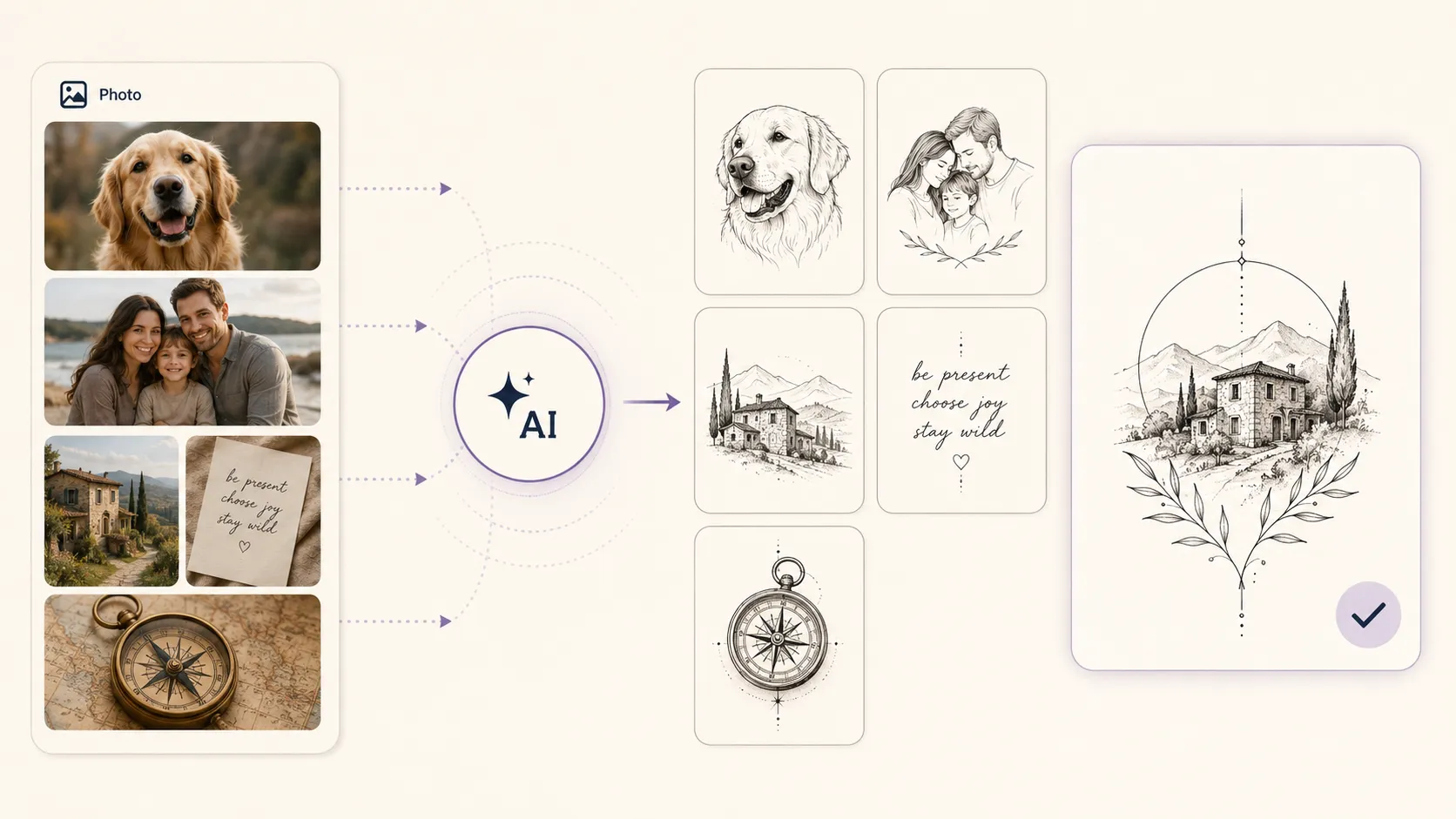
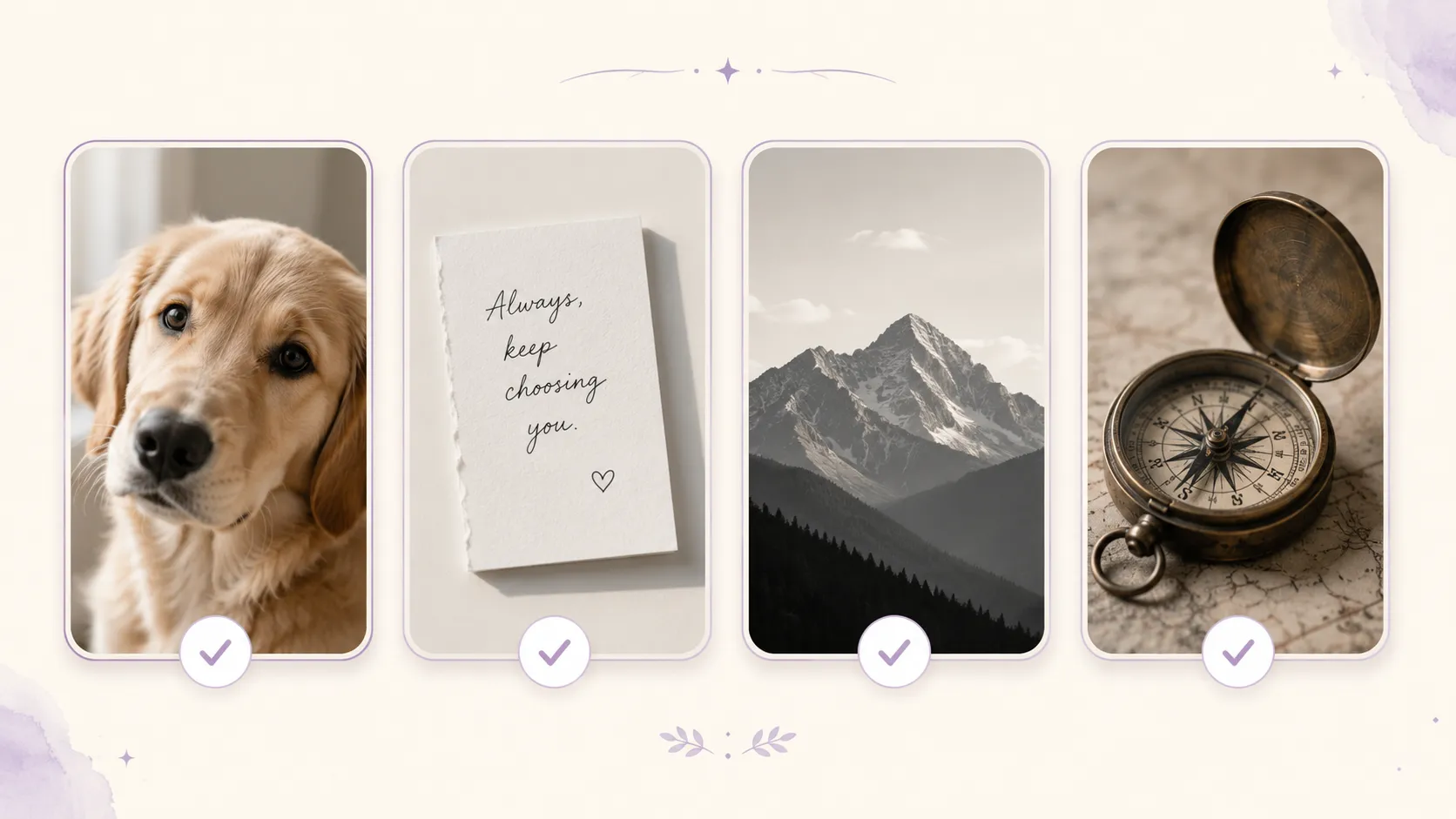
Photos are powerful tattoo references because they are personal. A pet, a family member, a travel view, an old house, a handwritten note, or a meaningful object can all become tattoo inspiration.
But a photo is not automatically a good tattoo. Photography can rely on color, lighting, background, and tiny details. Tattoo design needs stronger shapes and clearer visual hierarchy.
That is why a photo often needs to be simplified before it becomes a tattoo concept. An image to tattoo generator can help translate a photo into a tattoo-style direction by reducing unnecessary background details and emphasizing the subject.
What Photos Work Best
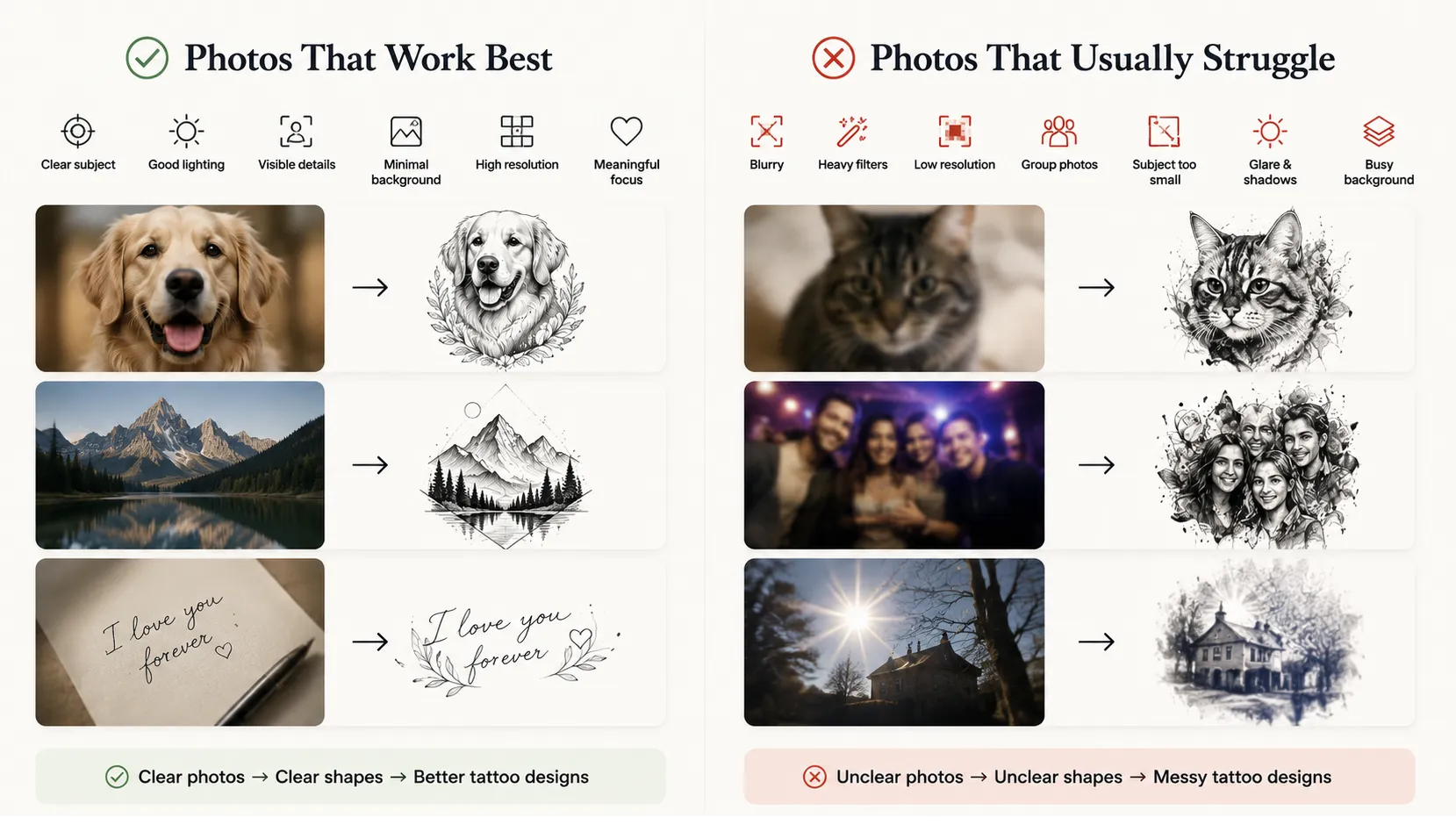
The best source photos usually have:
- A clear main subject
- Good lighting
- Visible facial features or object edges
- Minimal background clutter
- Enough resolution for the AI to read details
- A strong emotional or visual focus
A close-up pet portrait often works better than a full-body photo taken from far away. A clean picture of a handwritten note works better than a blurry photo with shadows across the paper. A simple mountain silhouette works better than a busy landscape filled with small objects.
What Photos Usually Struggle
Some photos are harder to turn into tattoo designs:
- Blurry images
- Heavy filters
- Low-resolution screenshots
- Group photos with many faces
- Images where the subject is too small
- Photos with strong glare or deep shadows
- Backgrounds that compete with the subject
The issue is not that AI cannot process them. The issue is that unclear source images often lead to unclear tattoo concepts. If the AI cannot identify the most important shape, the final result may feel messy.
How to Prepare a Photo Before Uploading
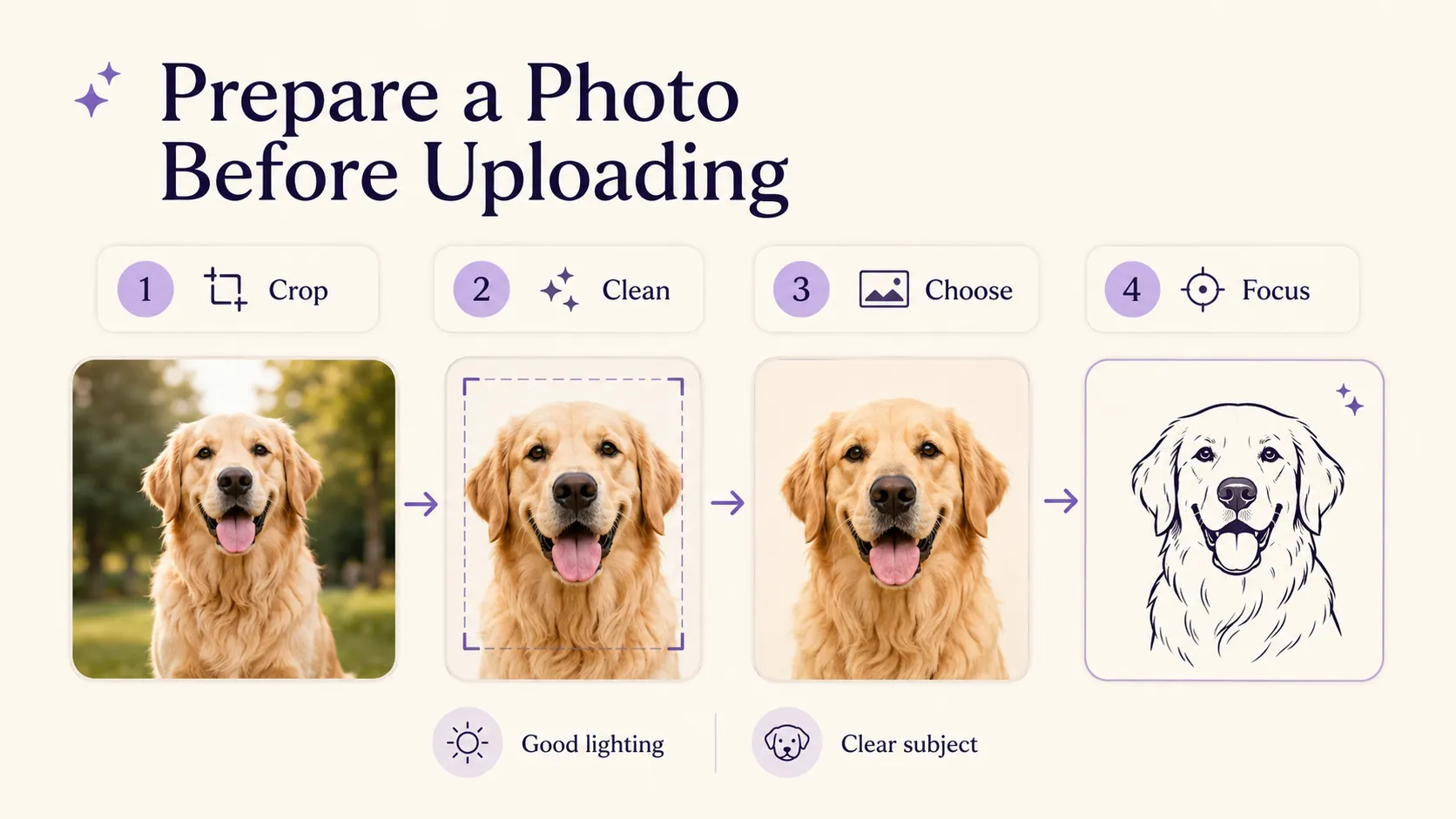
Before using a photo for tattoo design, make a few simple adjustments.
Crop the image around the main subject. Remove extra background when possible. Choose the clearest version of the photo. If you have several images of the same subject, pick the one with the strongest expression or most recognizable shape.
For pet tattoos, a front-facing or slightly angled headshot usually works well. For memorial portraits, choose a photo that captures the person’s expression clearly. For landscapes, focus on the part that makes the place recognizable, such as a mountain line, skyline, bridge, or coastline.
A good tattoo reference does not need to include everything in the original photo. It needs to preserve the part that matters.
The Best Photo-to-Tattoo Ideas
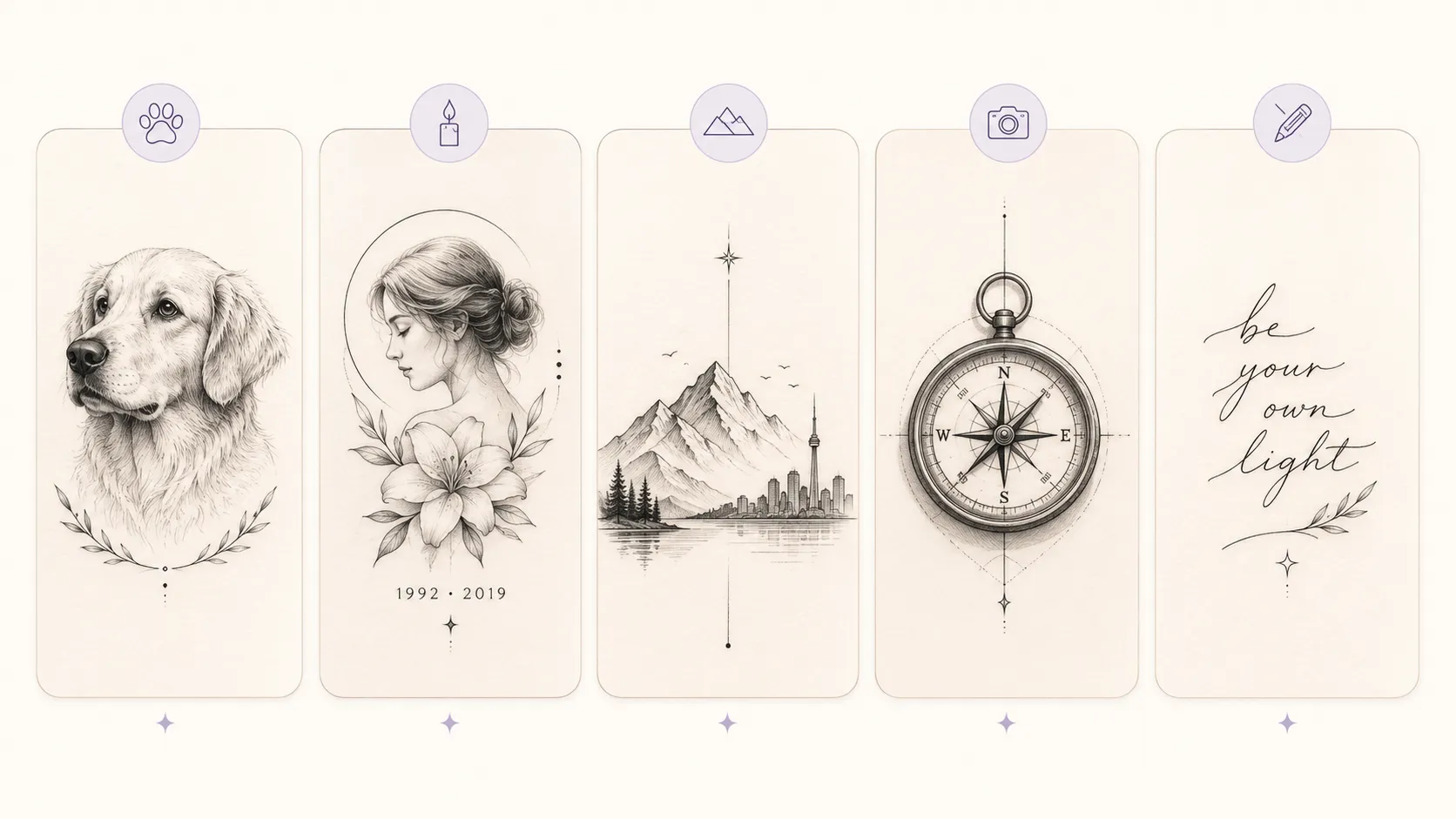
Photo-based tattoos work best when the image carries personal meaning and can be simplified into a strong design.
Pet Tattoos
Pet tattoos are one of the most natural uses for photo-to-tattoo tools. A clear pet photo can become a realistic portrait, a fine line drawing, or a small symbolic outline.
For a simple tattoo, focus on the face, ears, eyes, or unique markings. For a larger piece, you can include flowers, a name, a date, or a small background element.
Memorial Tattoos
Memorial tattoos need care. The goal is not always perfect realism. Sometimes a softer symbolic design feels more timeless.
A portrait can be paired with a favorite flower, a date, a signature, or a short phrase. A handwriting sample can also become part of the design. In many cases, a simplified black and grey version may age better than a highly detailed image.
Travel and Place Tattoos
A travel photo can become a mountain outline, city skyline, ocean wave, map-inspired design, or architectural line tattoo.
The key is to identify the most recognizable part of the place. A skyline, bridge, temple, mountain peak, or coastline often works better than a full scenic photo.
Object Tattoos
Objects can hold deep meaning. A ring, camera, guitar, book, car, toy, or family heirloom can become a tattoo if the shape is clear.
Object-based tattoos often work well in fine line, black and grey, or illustrative styles. The design does not need to look exactly like the photo. It only needs to carry the memory clearly.
Handwriting Tattoos
Handwriting tattoos are personal because they preserve the original human touch. A note, signature, date, or short sentence can become a simple but powerful tattoo. For best results, use a clean photo or scan with strong contrast. The background should be plain, and the letters should be easy to read.
Turning Names, Dates, and Quotes into Tattoo Lettering
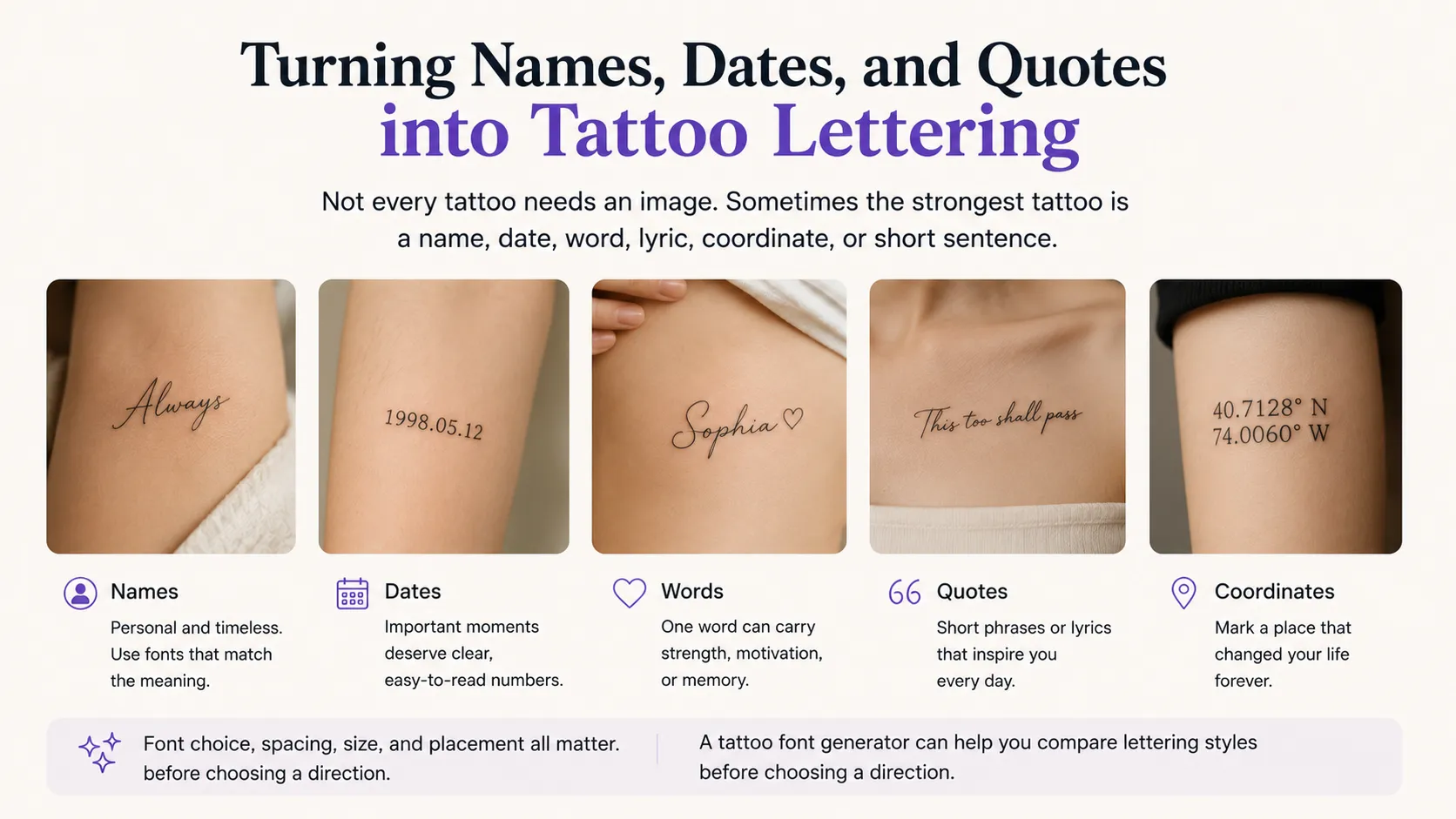
Not every tattoo needs an image. Sometimes the strongest tattoo is a name, date, word, lyric, coordinate, or short sentence.
Lettering tattoos look simple, but they are easy to get wrong. Font choice, spacing, size, and placement all matter. A word that looks beautiful on a screen may become hard to read when it is too small or too decorative.
A tattoo font generator can help you compare lettering styles before choosing a direction.
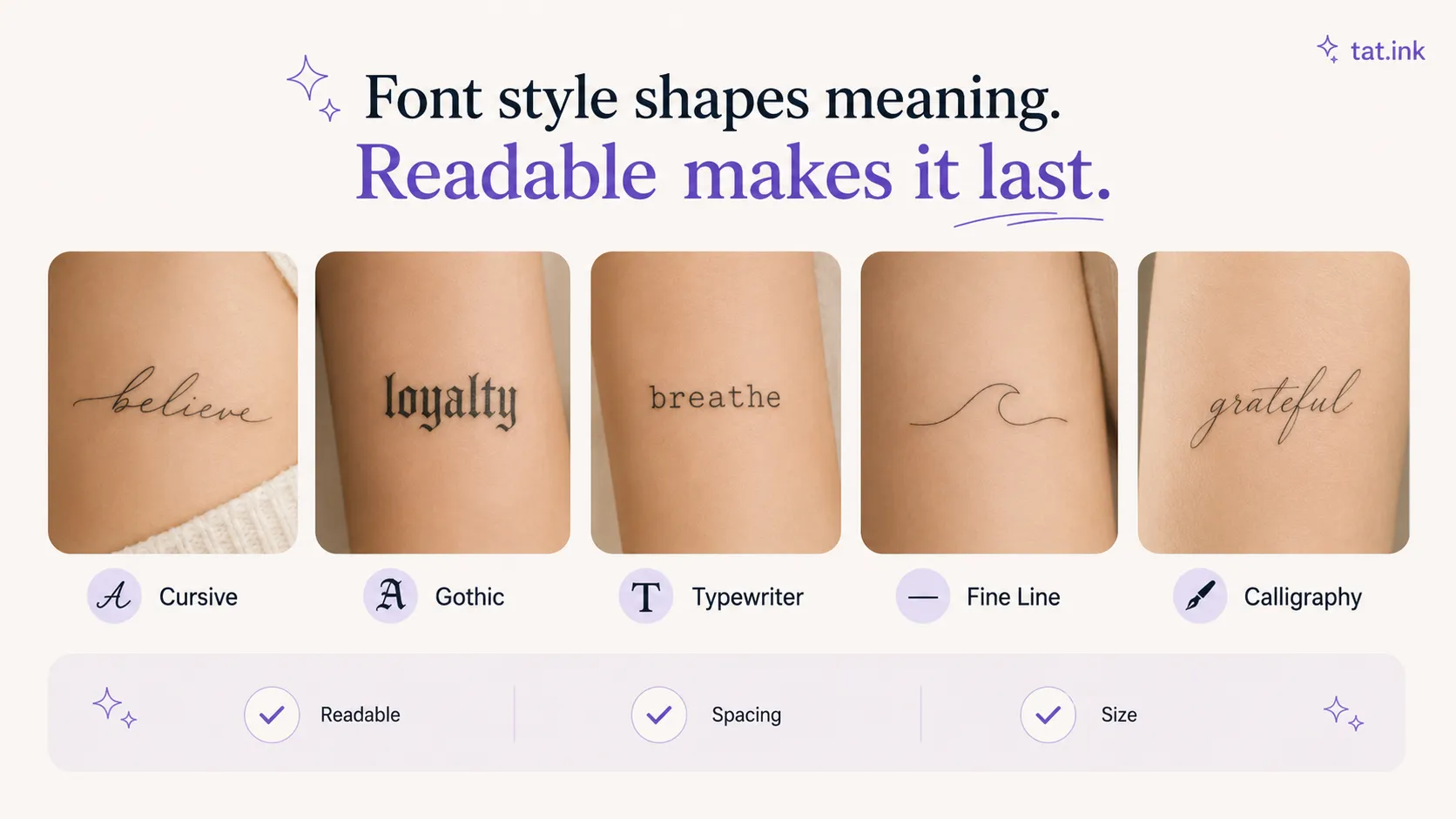
Choosing a Font Style by Meaning
Different lettering styles create different emotions.
Cursive fonts often feel personal, soft, and elegant. They work well for names, memorial phrases, and short meaningful words.
Gothic fonts feel bold, dramatic, and old-world. They may suit darker themes, religious references, or strong visual statements.
Typewriter fonts feel quiet, literary, and nostalgic. They work well for quotes, dates, and short phrases.
Fine line lettering feels clean and modern. It is a good option for small tattoos, initials, and subtle placements.
Calligraphy feels artistic and ceremonial. It can work beautifully, but it needs enough space to stay readable.
Keeping Lettering Readable
The biggest mistake with lettering tattoos is choosing a style that is too detailed for the size.
Thin strokes can fade. Tight spacing can blur. Very small cursive can become difficult to read. Long quotes can feel cramped if placed on a narrow area like the wrist or ankle.
Before choosing a lettering design, check three things:
Can the words be read quickly?
Is there enough spacing between letters?
Will the design still look good if simplified?
A tattoo artist can adjust the final letter spacing and line weight, but it helps to start with a clean direction.
Choosing the Right Tattoo Style
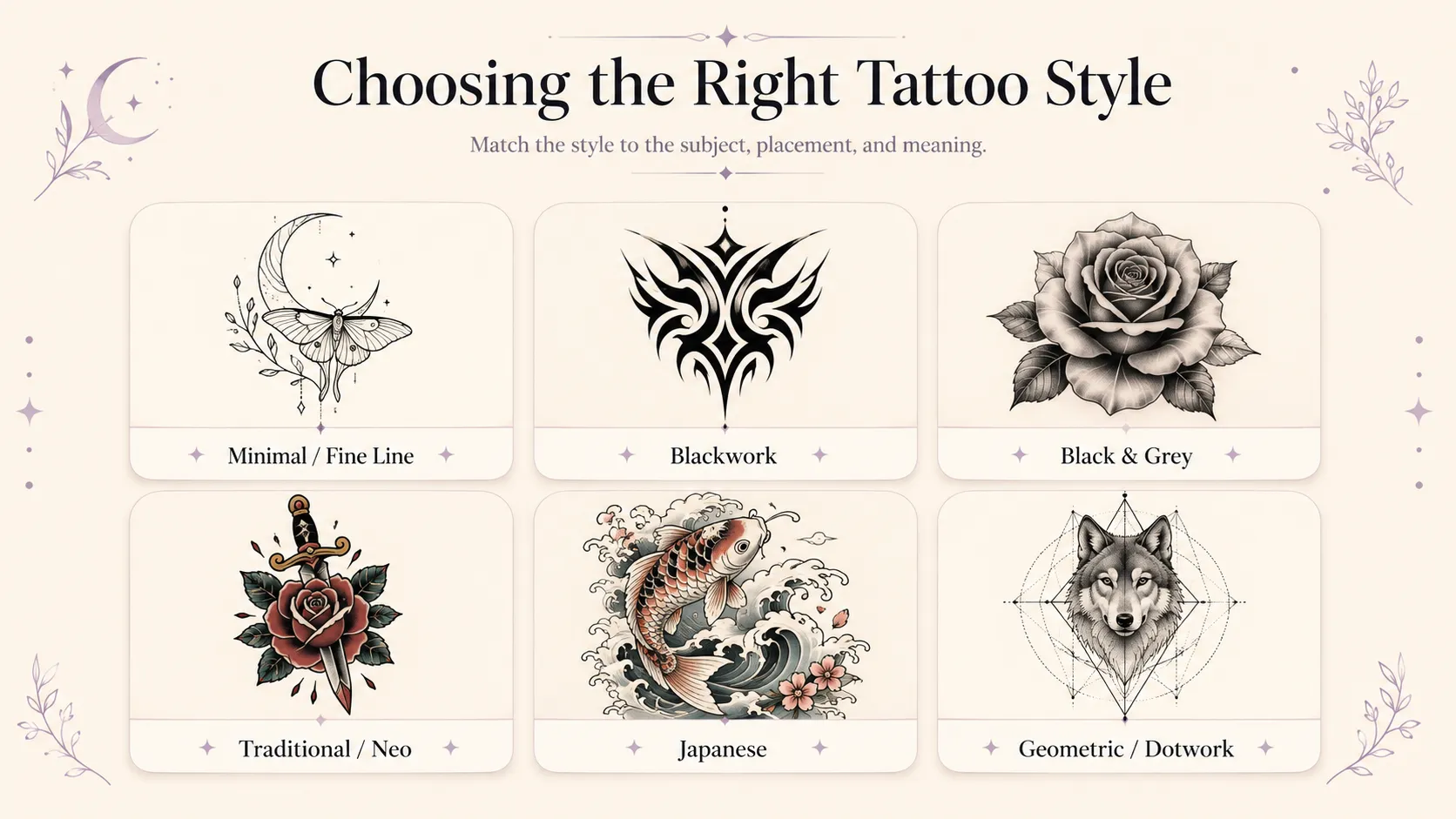
Style should not be chosen only because it looks trendy. It should match the subject, the placement, and the meaning behind the tattoo.
Minimalist and Fine Line
Minimalist and fine line tattoos work well for small, subtle, and personal designs. They are often used for symbols, flowers, handwriting, simple animals, stars, moons, and small memorial pieces.
They look clean, but they should not be overloaded with tiny details. If the tattoo is small, the idea needs to stay simple.
Blackwork
Blackwork uses strong black shapes, bold contrast, and graphic impact. It works well for geometric designs, dark concepts, abstract patterns, tribal-inspired work, and large statement tattoos.
Because blackwork can feel visually heavy, placement is important. It often works best when the body area has enough space.
Black and Grey
Black and grey is one of the most flexible tattoo styles. It works well for portraits, animals, flowers, religious themes, statues, skulls, and memorial tattoos.
This style can hold emotion without relying on color. It is also a strong choice when the design needs depth, shading, and a classic tattoo feel.
Traditional and Neo Traditional
Traditional tattoos use bold outlines, strong shapes, and iconic imagery. They work well for roses, daggers, eagles, snakes, hearts, ships, and classic flash-inspired designs.
Neo traditional keeps the bold structure but allows more detail, color, and modern illustration.
These styles are useful when you want a tattoo that reads clearly from a distance.
Japanese-Inspired Tattoo
Japanese-inspired designs often use movement, flow, and large compositions. Dragons, koi fish, waves, cherry blossoms, masks, and tigers are common themes.
This style is especially suitable for arms, legs, backs, and larger body areas because the design often needs space to breathe.
Geometric and Dotwork
Geometric tattoos work well for symmetry, symbols, sacred geometry, animals, mandalas, and abstract concepts.
Dotwork adds texture and shading through small dots. It can make a design feel detailed without using heavy solid shading.
Matching Tattoo Ideas with Better Style Choices
Here is a practical way to think about style selection:
| Tattoo Idea | Better Style Direction | Why It Works |
|---|---|---|
| Pet portrait | Fine line, black and grey, realism | Keeps the pet recognizable while allowing emotion |
| Memorial tattoo | Black and grey, script, minimalism | Feels respectful, personal, and timeless |
| Small symbol | Minimalist, geometric, fine line | Stays readable at a small size |
| Dragon or mythological design | Japanese-inspired, blackwork, traditional | Supports movement, power, and larger composition |
| Flower tattoo | Fine line, black and grey, neo traditional | Can be soft, detailed, or bold depending on mood |
| Quote or name | Cursive, typewriter, fine line, calligraphy | Focuses attention on the meaning of the words |
| Dark visual concept | Blackwork, gothic, trash polka-inspired | Creates strong contrast and emotional intensity |
| Travel memory | Minimalist, fine line, geometric | Simplifies places into clean, recognizable shapes |
This is also why generating several versions is useful. The first style you imagine may not be the one that fits the design best.
Previewing a Tattoo Before You Commit
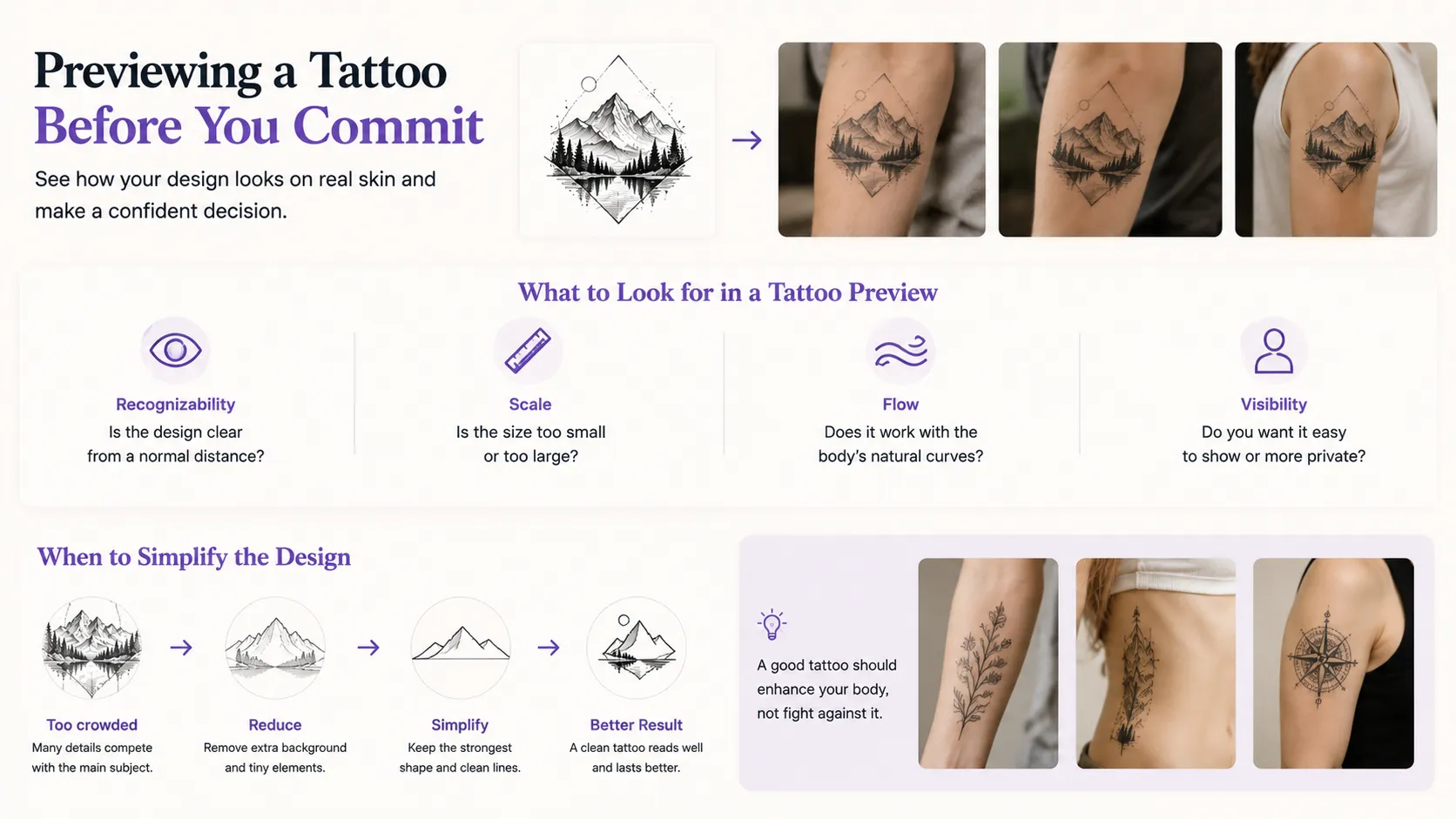
A tattoo design can look great as a flat image but feel different once placed on the body. Size, angle, skin tone, muscle shape, and body movement can all affect how the design looks.
That is why previewing placement is an important step. A virtual tattoo simulator lets you see how a design may look on a real body area before making a final decision.
What to Look for in a Tattoo Preview
When checking a tattoo preview, do not only ask whether the design looks cool. Look at practical details.
Check whether the subject is still recognizable from a normal viewing distance. A design that only looks good when zoomed in may be too detailed.
Look at the scale. If the tattoo is too small, details may disappear. If it is too large, it may feel heavier than expected.
Check the flow. A good tattoo should work with the body, not fight against it. Curved placements like shoulders, arms, ribs, and legs may change how the design feels.
Think about visibility. Some users want a tattoo that is easy to show. Others want something more private. Placement preview can help you decide before making a permanent choice.
When to Simplify the Design
If a preview looks crowded, the answer is usually not to make the tattoo smaller. It is often better to simplify the design.
Remove extra background elements. Reduce tiny texture. Keep the strongest shape. Make the linework cleaner. A simple tattoo that reads well is usually better than a complex tattoo that becomes unclear.
A Practical Workflow for Planning a Tattoo with Tat Ink
A clean workflow can help you avoid random results and make better decisions.
Step 1: Start with the Main Idea
Begin with the core meaning. Do not start by adding every possible detail. Ask yourself:
What is the tattoo about?Is it personal, decorative, symbolic, memorial, or aesthetic?Does it need to include a person, pet, object, word, or place?Should it feel soft, bold, dark, elegant, playful, or spiritual?
Once the idea is clear, use the best free AI tattoo generator to create the first visual direction.
Step 2: Use a Photo If the Tattoo Is Based on Something Real
If your tattoo comes from a real memory, person, pet, place, or object, use a photo instead of trying to describe everything in words.
Upload a clear image through the tattoo design from photo and test different styles. A pet photo may work in fine line, black and grey, or a simple outline. A travel photo may work better as a minimalist landscape or geometric design.
Step 3: Add Lettering Only When It Supports the Design
Names, dates, and quotes can make a tattoo more personal, but they should not be forced into every design.
If text matters, test it separately with the tattoo lettering generator. Compare a few styles and check readability before combining the lettering with the main image.
Step 4: Generate Multiple Versions
Do not stop after one result. Generate several versions with small changes.
Try different styles. Change the mood. Simplify the prompt. Add placement. Remove unnecessary details. Sometimes the best design appears after you understand what was wrong with the first few attempts.
Save the strongest versions so you can compare them later. A design that feels exciting immediately is not always the one you will still like tomorrow.
Step 5: Preview the Placement
Use the virtual tattoo try on online to test the design on the body area you are considering.
Look at size, flow, visibility, and balance. A tattoo that works on the forearm may not work on the wrist. A design that looks good on the shoulder may need a different curve for the ribs or thigh.
Step 6: Bring the Best Direction to a Tattoo Artist
Once you have a strong concept, bring it to a professional tattoo artist. Tell them what you like about the AI design and what parts are flexible.
This makes the conversation easier. Instead of trying to explain a vague idea, you can show a visual direction. The artist can then refine it for real tattooing.
Final Thoughts
AI tattoo generators make tattoo planning easier, but their real value is not replacing the creative process. Their value is helping you see more possibilities.
You can turn a rough idea into a visual concept. You can transform a meaningful photo into tattoo-style artwork. You can test lettering before choosing a font. You can preview placement before making a permanent decision.
Most importantly, you can walk into a tattoo consultation with a clearer direction.
A good AI tattoo design workflow should not feel rushed. Use AI to explore, compare, and refine. Then work with a skilled tattoo artist to turn the strongest idea into a design that fits your body, your story, and your long-term taste.